

Clean up your photo library.
Right on your iPhone.
Fotiq tracks down duplicate photos, screenshots, failed shots and large videos for you. The analysis runs on your iPhone, and nothing is removed without your approval.

- iPhone
- iPad
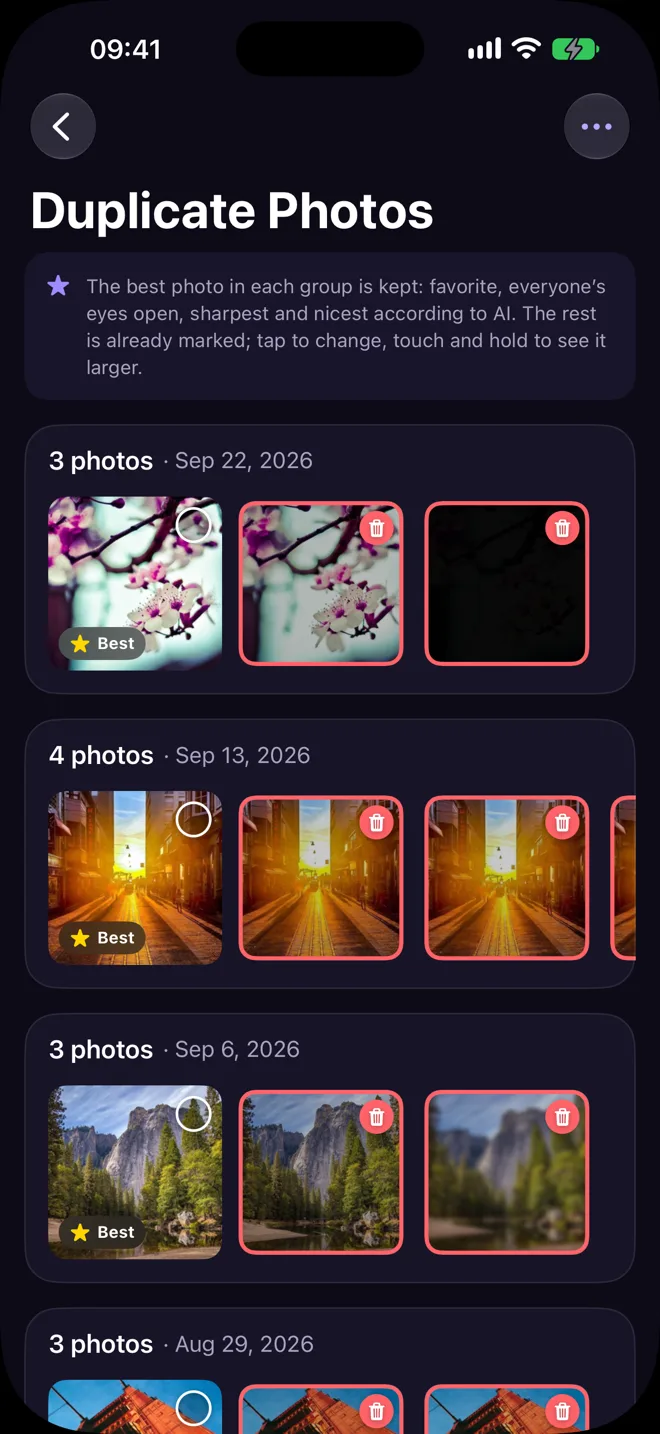
The best one stays, the rest is ready to go
Fotiq groups duplicate and near-identical photos and picks the best of each group: a favorite, the shot where everyone has their eyes open, the sharpest one. The rest is already selected. Don't agree? One tap changes it.
- Also series and bursts of the same moment
- Touch and hold a photo to see it larger
- Favorites are never suggested for removal
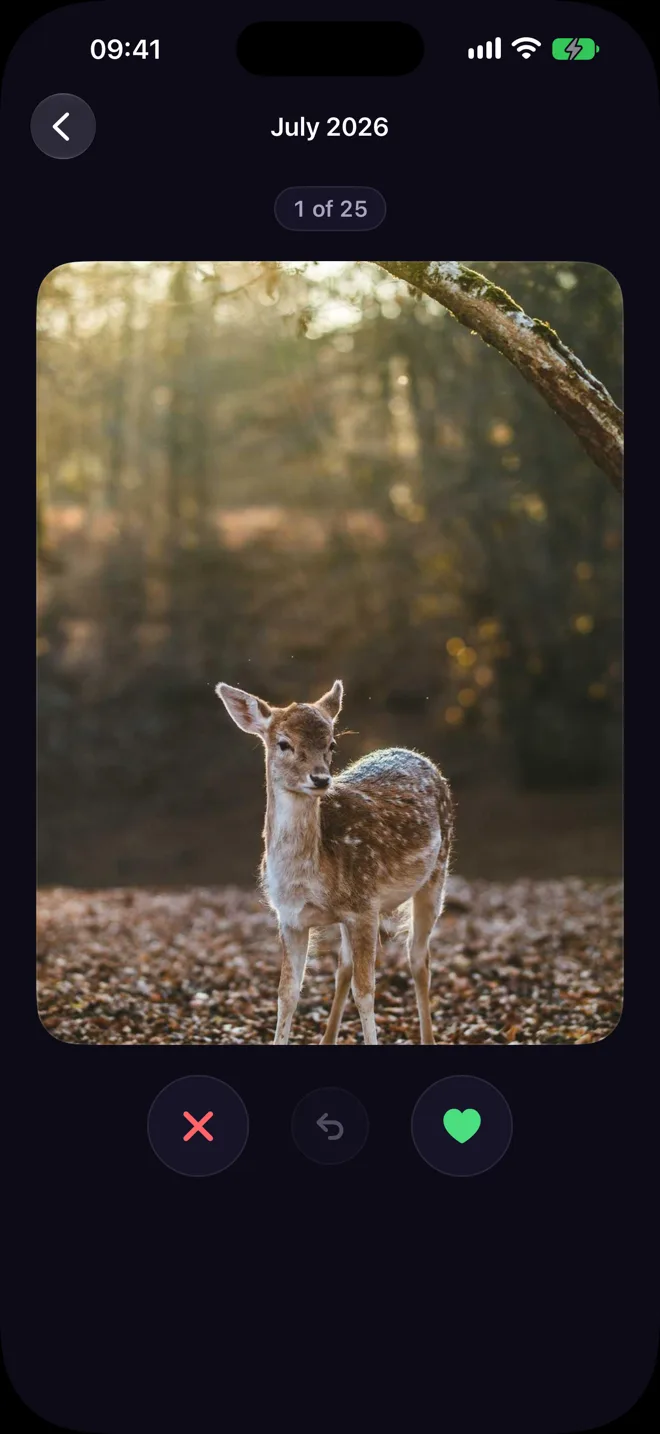
Go through your photos month by month
Prefer to decide yourself? Swipe through your library one month at a time: left to delete, right to keep. A wrong swipe is undone with a single tap.
- Add photos to your Always keep list and they won't come up again
- On iPad you can use the keyboard too
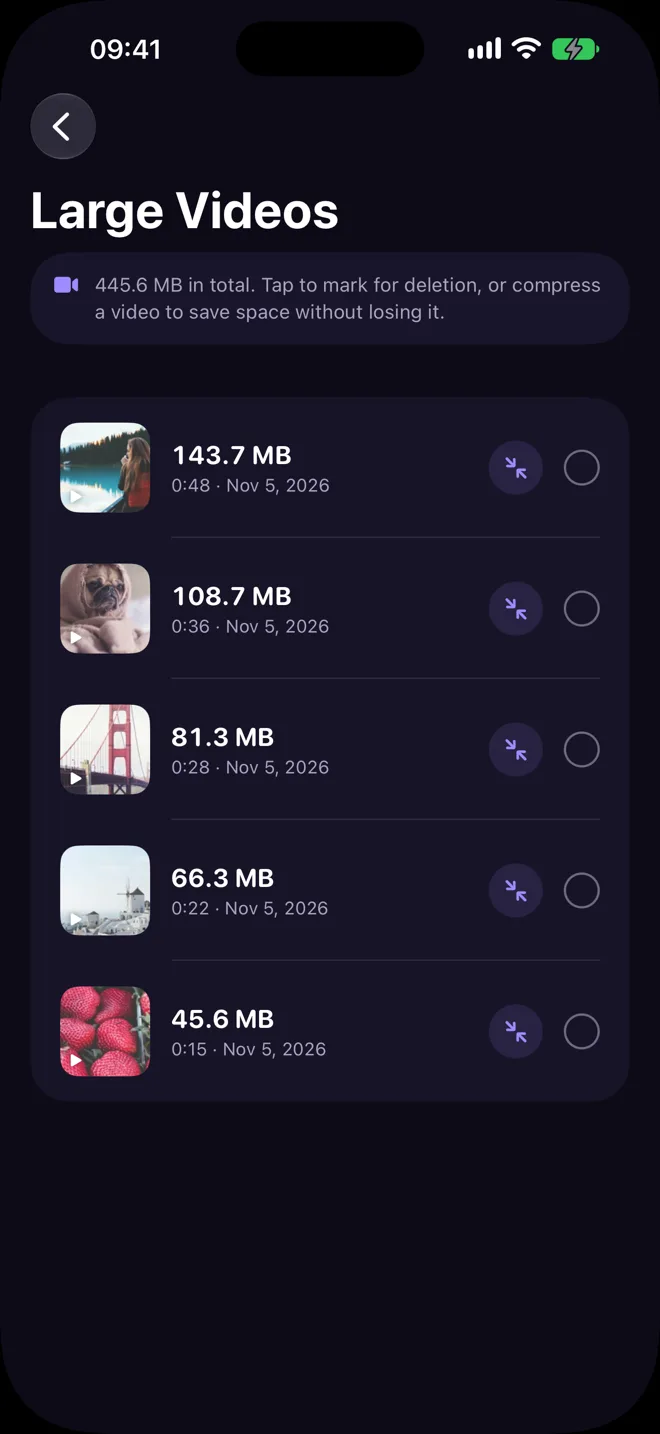
See which videos take up the most space
Videos are usually the biggest storage hogs. Fotiq lists your largest videos with their size and length. Delete them, or with Pro make them up to 70% smaller without losing them.
- Compression happens on your iPhone
- Date, location and favorite are kept
- With Pro you can also convert Live Photos to regular photos
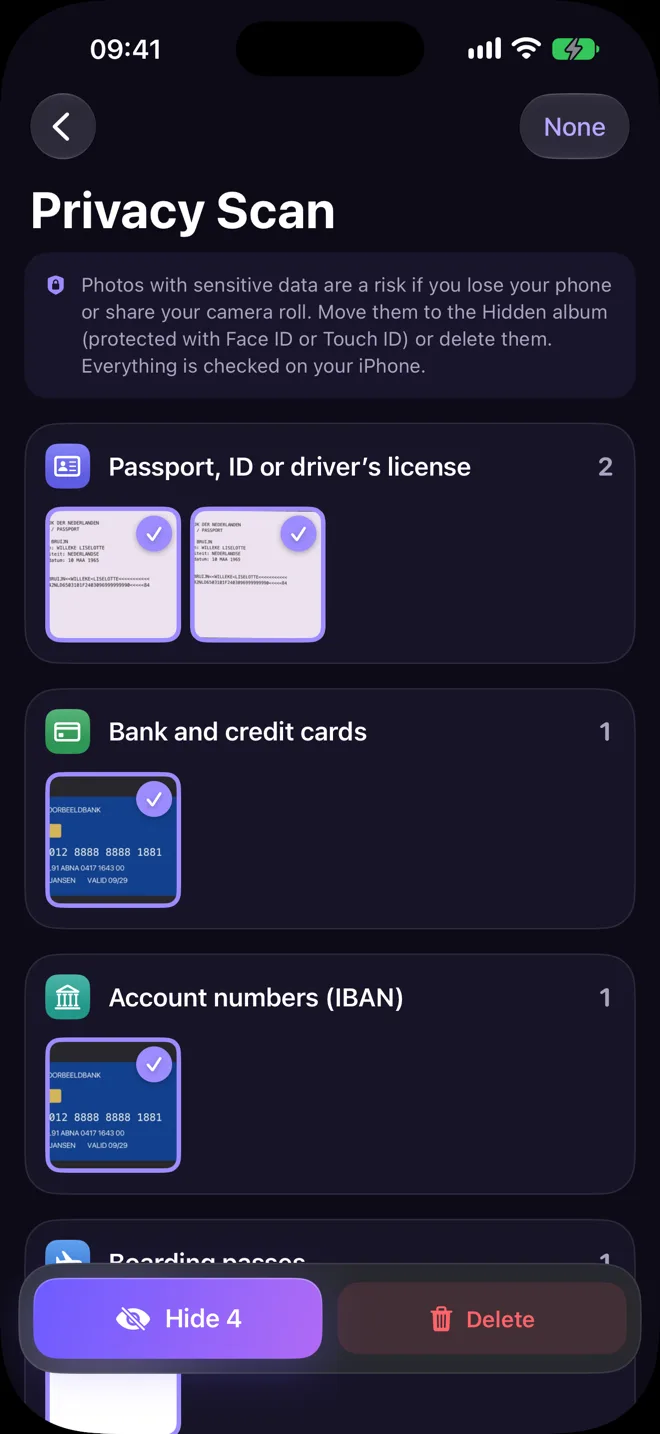
Find sensitive photos and lock them away
A photo of your passport or bank card is a risk if you lose your phone or share your camera roll. The privacy scan finds them. You move them to the Hidden album, which iOS protects with Face ID, or delete them.
- Passports, ID cards, driver's licenses, bank cards, account numbers (IBAN), boarding passes and passwords
- For any number it finds, Fotiq only shows the last four characters
- Everything is checked on your iPhone
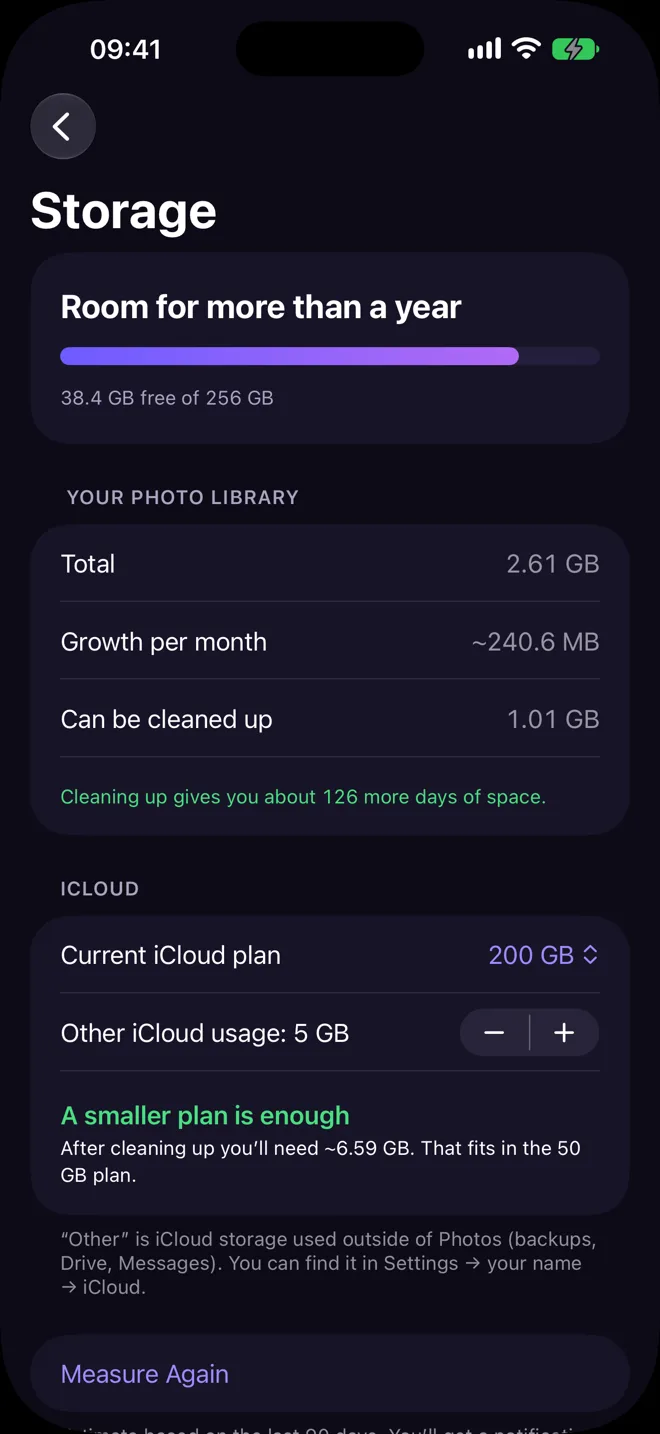
Know when your iPhone will be full
Fotiq works out how fast your photo library grows and how much extra time a cleanup buys you. Enter your iCloud plan and you'll see whether a smaller plan would do after cleaning up.
- You get a notification a week before your iPhone is full
- You enter your iCloud usage yourself; Fotiq never looks inside your iCloud account
Everything at a glance
Screenshots and documents
Screenshots, receipts, maps, notes and tickets are grouped together, so you can clear them out in one go.
Blurry and too dark
Shaky, out-of-focus and underexposed photos get a list of their own.
Taken by accident
Pocket shots, ceilings and a finger over the lens. Also photos of screens, memes and saved images.
Search in plain words
Search your photos the way you'd describe them, including text that appears in the photo.
Screenshots become tasks
Add a date from a screenshot to your calendar or turn it into a reminder, then clean up the screenshot.
Receipt overview
All your receipts in one list, with store, date and amount. With Pro you can export them as PDF or CSV.
Smart cleanup
With Pro you clear all suggestions in a single tap.
Night autopilot
With Pro, Fotiq checks your new photos overnight while your iPhone charges, and lets you know in the morning when there's enough to clean up.
Free, with Fotiq Pro when you want more
Fotiq is free to download and lets you clean up 25 photos a day at no cost. Fotiq Pro removes that limit and adds smart cleanup, the night autopilot, video compression, Live Photo conversion, receipt export and an optional cloud AI analysis. In the Netherlands, Pro costs €3.99 a month, €19.99 a year (with a 3-day free trial) or €39.99 once for lifetime access. Prices in other countries are shown in the App Store.
Good to know
Do my photos get uploaded anywhere?
Not by default. The analysis runs on your iPhone using Apple's built-in image recognition, and your photos stay on your device. There is one exception, and you switch it on yourself: the cloud AI analysis in Fotiq Pro. If you give permission for it in the app, a downsized copy (768 pixels at most, without location or file name) of photos the app is unsure about is sent through our server to Anthropic, which assesses whether the photo can go. We don't store those copies. There's no account, no ads and no tracking.
Could I lose something by accident?
Fotiq never deletes anything on its own. You choose what goes, and iOS then asks you to confirm. Deleted photos stay in Recently Deleted for 30 days. Favorites and photos on your Always keep list are never suggested.
What can I do without Pro?
Scanning, browsing all suggestions, swiping, the privacy scan, search and the receipt overview. You can delete 25 photos a day for free. Pro makes that unlimited and adds smart cleanup, the night autopilot, video compression, Live Photo conversion and receipt export.
Does Fotiq need access to all my photos?
You decide whether Fotiq can see your whole library or just part of it. You can change or revoke that at any time under Settings > Privacy & Security > Photos.
Does Fotiq work on iPad?
Yes. Fotiq runs on iPhone and iPad with iOS 18 or later. On a larger screen your results and the selected section sit side by side, and you can use the keyboard.
How do I cancel Pro?
You cancel a subscription in your App Store settings. It renews automatically unless you cancel at least 24 hours before the end of the current period. The one-time lifetime purchase never expires.
More apps by WeMeekIt
 BamBuddyWatch and control your 3D printers on iPhone, iPad, Mac, Apple Watch and Apple TV.
 DomusYour whole Apple Home on one screen, with dashboards you build yourself and an iPad on the wall as a control panel.
 TheatrumRequest films and series from your own Seerr server, follow them until they are ready, and manage your stack from your iPhone.
 PartyLightsMakes your smart lights move to your music, straight over your own Wi-Fi.
 DesksideScan a serial number and see the Intune, Autopilot and Entra ID status at once.
Free up space today
Download Fotiq for free from the App Store. After the first scan you'll see right away how much space you can win back.